Which keywords bring traffic to your competitors — and which of them you can take.
A one-time report on your website or product: the keywords people type in each country, who holds the top 10, and what to fix on your site. No subscription.
What the report looks like
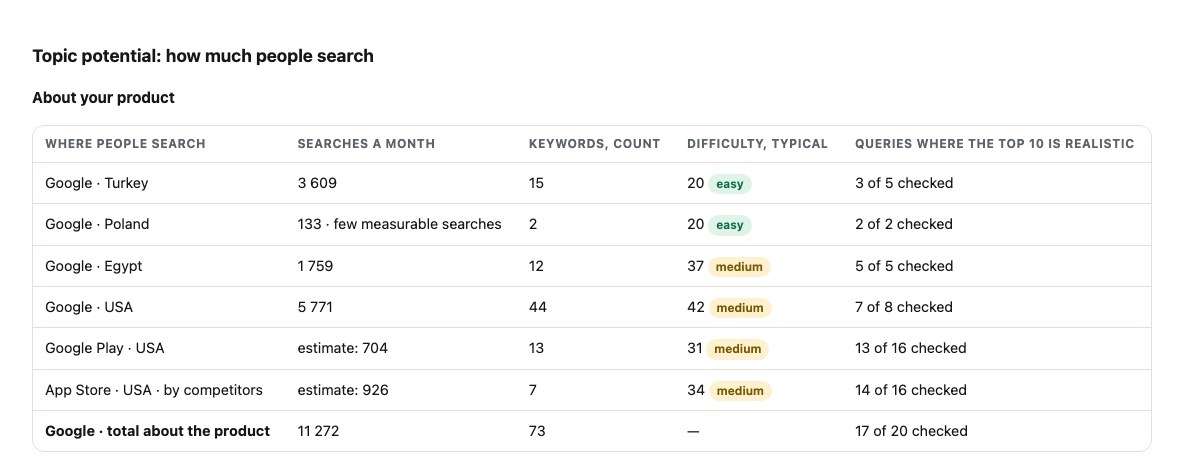
A page from a real report on our own product: how much people search in Google by country and in Google Play and the App Store, difficulty, and where the top 10 is realistic.
One report that shows whether there is demand here, who holds it and where to start. A web page, PDF and Excel at a permanent link.
Market potential in numbers
How much people search for your product in Google in each country and in Google Play and the App Store, how many keywords, how hard they are and how many of them can realistically reach the top 10.
The main keyword and where to put it
The query to start with: in the title, the subtitle, on a website page or in an article — with why this one and not its neighbour.
Who holds the top 10, and the real competitors
Websites, SaaS, apps and extensions people see instead of you, in one table: which query found them, rating, installs, how direct a competitor they are. The ones you name come first.
Queries where competitors are and you are not
The gap in Google and in the store: words that already bring traffic to others and that you can take with a description, a page or an article.
What competitors are paid for and what people complain about
Hundreds of competitor reviews: who their users are and how they search in their own words; what they praise and pay for; what annoys them. Next to each value — whether you have it and what to say in the first lines of your listing. Plus competitors' plans and prices.
Do AI assistants name you
ChatGPT, Claude, Gemini and Perplexity answer your audience's questions: how often they name you, who they name instead, and what to do so they name you more often.
Countries: where it is easier to grow
From easiest to hardest, with the best query in each; and where there is demand beyond the countries you ordered.
What to fix, and a three-month plan
What to fix on your website or app listing right now; the first week, three months; a traffic forecast as a range and what makes you grow further.
Who it is for and what it gives
Three situations and the next step in each.
Idea or pre-launch
Your phrase has no demand — people search differently
Build the name and the first screen around the phrase people type — before you spend on development.
Riwords grew out of a method I used on my own products: they found users through search, with no paid ads. Riwords is that method as a report.
Data: up-to-date Google data for each country — search, volumes, results — and the official app stores, fetched fresh for every report. The analysis follows the method we use on our own products: rules tested on them and refined with every report.
Every plan includes the full report for the first country: all sections, a web page, PDF and Excel at a permanent link. Other countries get keywords in their language, difficulty, a forecast and the comparison.
One country
$24
The full report for one country of your choice
All the queries people use to search for your product: target, category, questions and low-volume — with volume and difficulty; the main keyword and where to put it
Potential: how much people search in Google and in Google Play / the App Store, and for how many queries the top 10 is realistic
Competitors from the country's search results: websites, apps, extensions — and the queries they were found by
Competitor reviews: what they are paid for and what people complain about, and whether you have it; for apps — their plans and prices
The gap: queries where competitors are and you are not — in the store for an app, in Google for a website
Where in the world your main queries are typed
AI assistants: do they name you, and what to do so they do
What to fix on your website or listing, a three-month plan, a traffic forecast
Competitor keywords, search demand per country, difficulty, reviews and pricing — for your app or website, for every market you choose.
We already have your product details from this brief — just pick the markets.
Your real competitors with positioning, and the keywords each one ranks for — in the store and in Google, with searches and real clicks
Your own phrases checked: is there demand — or do people search differently, and how
Keywords people actually type, 100–180 per country, with volume, real clicks, difficulty in Google and in the store — and the low-competition short list
Which keywords go where: title, subtitle, description, keyword field, site page or article
Competitor reviews digest (1,000+, sub-4★ first): what users pay for, what they hate, who actually uses them; competitor pricing and trials
AI visibility: ChatGPT, Claude, Gemini, Perplexity — are you named, who is, which pages they cite. Cost per click for every keyword — the same list works for search ads
Article topics with search volume, and 10 extra keyword checks of your choice from the report page
Localized keywords for every country you choose — what people type there, not a translation
Expert conclusion: what to do first, realistic traffic estimate, risks — plus PDF and Excel
Tick up to 10 countries. For each one the report builds its own keyword set in its language.
For websites, competitors and their keywords come from the search results of the chosen country. For apps, store data (keywords, positions, the gap) exists only for the US; in other countries the report relies on Google and competitor websites.
One-time payment, no subscription. The report builds in 15–30 minutes on a permanent link; PDF and Excel are there to download. Your idea stays private.
Check before you pay
A real sample report
The full report on our own product, without edits — the same sections and tables you get.
Where search data for a country is not visible, the report says so instead of inventing a number. Traffic is a range, not a promise.
Clear terms
One-time payment, no subscription. If the report is not delivered within 24 hours for reasons on our side, we refund in full. Questions — [email protected], reply within one business day.
A permanent link with the full report as a web page, PDF and Excel: your competitors with positioning and the keywords they rank for; the keywords people actually type with volume, real clicks and difficulty per country; a check of your own phrases; what competitor users praise and complain about; competitor pricing; AI-assistant visibility; the title, subtitle and keywords for your listing or site; an expert conclusion with a traffic estimate; and 10 extra keyword checks from the report page. No subscription. Before paying you see the free brief and the real sample report on this site.
What keywords are my competitors using? Can you show me?
Yes — that is the core of the report. For apps: the keywords each competitor ranks for inside the App Store or Google Play, how often they are searched there, and the queries their site ranks for in Google. For websites: the queries each competitor's site ranks for, with monthly searches and real clicks. The free brief already shows the words competitors put in their titles; the full report gives the ranked lists and the gap — keywords where two or more competitors rank and you don't.
How do I find low-competition keywords for my app or website?
The same way we work on our own products: take every phrase people actually type around your product, keep the ones with real clicks, then check who sits in Google's top 10 and how strong the apps ranking for it in the store are. Where demand exists and the top is weak — forums, small sites, apps with few ratings — that is your entry. The report gives this short list with numbers for each keyword, not a 'keyword difficulty' badge you have to trust.
How do I choose keywords for my website or app listing?
From data, not guesses: the report splits keywords into 'people search for exactly this kind of product' and 'they search for the category', shows demand and difficulty for each, and tells you where each one goes — title, subtitle, description, keyword field, a page on your site, or an article. Then it writes the title and description around the best ones.
Who are my competitors, really?
Not the two big brands you name — the ten products a user sees when searching for what you do. We search the store (or Google, for websites) with a dozen phrases your users would type, score every product by how often and how high it appears, and let an AI drop platforms and unrelated categories. Each competitor comes with the query it was found by, its positioning, what its users value and hate, and its prices.
How much traffic can I expect?
Honestly: it depends on the keywords you can win. The report estimates it for your case with a click model (top-3 ≈ 30% of real clicks, top-10 ≈ 7%) on the keywords where the competition is beatable — and states the method, so you can argue with it. Your niche may be smaller or larger; the report tells you which.
Where does the data come from, and how far can I trust it?
Search volumes and difficulty come from search-data providers, the top 10 from Google itself, store data from the App Store and Google Play. The traffic forecast is a range, not a promise; where demand in a local language is not visible to the sources, the report says so instead of inventing a number.
Does ChatGPT recommend my app? Does that matter?
More people ask AI assistants 'which app does X' every month. We ask ChatGPT, Claude, Gemini and Perplexity your niche's questions three times each and report how often you're named, who is named instead, and which pages the models cite — that list of pages is your plan to get into the answers. We don't promise 'traffic from ChatGPT'; we show whether you're visible there.
How is this different from Semrush, Ahrefs or ASO tools like AppTweak — and why not just ask ChatGPT?
ASO tools need a published app and assume you know ASO; they cost $9–$600 a month and give you data, not decisions. ChatGPT without data will guess the keywords. We start from a description (works before launch), combine store data, Google demand, real clicks, competitor reviews and AI visibility, and end with an expert conclusion: is organic growth realistic, how much traffic, what to do first. One-time price, no subscription.
Where does the data come from, and how accurate is it?
Competitors, ratings, update dates and reviews come live from the App Store and Google Play. Search demand is up-to-date Google data for each country; in-store search is App Store and Google Play data (US only). Every number is an estimate that says where it was measured — in Google or in a store, and in which country; the stores don't publish exact search volumes, and we won't pretend otherwise. Difficulty is our own calculation from the actual top 10.
I only have a website, or just an idea — no app in the store. Does it work?
Yes. For a website or SaaS we find competitors in Google search and show the keywords their sites rank for. For an idea, describe it in two sentences: we find who already serves that need, what people type to find it, and whether there is demand for your phrase at all — before you build anything.
I already know the query I want to rank for. Do I still need this?
Check it first: in our first client's case the phrase she planned to build around had zero searches — people with that exact problem search by symptom, not by role. The free brief checks your own phrases; the full report shows what people type instead, with volumes and difficulty.
My app is new. Will keywords alone get me to the top?
No. Ratings, downloads and a product that works matter too — in our test niche 38% of competitor complaints were 'it simply doesn't work'. Good keywords decide which searches you are eligible for and help the first users find you; they are the foundation, not a shortcut. The report says so plainly.
A question or a suggestion
Questions about a report, ideas, suggestions — write to us, we reply within one business day. Or email [email protected].